Start with the constraints you actually have
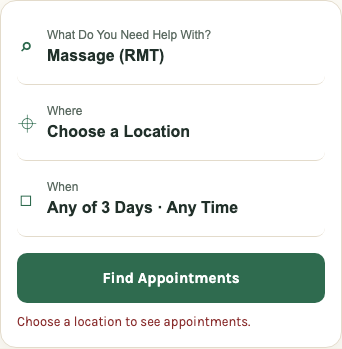
- Choose Massage (RMT) as your care type.
- Enter a location you can reach: home, work or another convenient starting point.
- Open When and select Today. Check this even if the search opens with Any of 3 Days selected.
- Choose a time range, then select Done and Find Appointments.
Allow time for travel and any intake the clinic requests. If it is already afternoon, look for a start time you can realistically make.
Keep the first search realistic. If you can only arrive after work, an afternoon appointment across the city is not useful simply because it is the earliest result. Compare the branch address and start time together.
If nothing fits, change one thing at a time
- Expand the distance only as far as you can reasonably travel.
- Widen the time range if your schedule allows.
- Check another practitioner if you are comfortable seeing someone new.
- Look at the clinic's available appointment lengths, and ask if you are unsure which is appropriate.
Keeping one constraint fixed makes it easier to see which change produced a useful option. Check the new-patient instructions before switching to a shorter appointment.
Check the appointment, not just the time
Before leaving Knead, read the service name, practitioner, duration, price if shown, and location. Watch for returning-patient restrictions. Clinics can make some appointment types available only to people who have visited before; Jane documents several ways clinics configure these rules.
If you are new to the clinic and only see follow-ups, contact reception. An unlabelled opening may also have eligibility rules.
Sources: Jane: online booking restrictions for returning patients.
Finish on the clinic's booking page
Knead helps you discover availability across clinics. The clinic handles the booking, payment terms, intake and cancellation policy. Availability can change between seeing an opening and reaching checkout, so use the clinic's current calendar as the final check.
- Confirm the correct date, time, branch and service.
- Read the cancellation and late-arrival terms.
- Check whether insurance or a referral requirement applies to your plan.
- Complete the clinic's booking steps and look for its confirmation.
You do not need a Knead account to search or follow a booking link. A clinic may require an account in its own system.
If insurance matters, verify the practitioner too
Use the BC regulator's registry to check the massage therapist's current licence, then ask your insurer whether the practitioner and service qualify under your plan. A service name such as deep tissue or relaxation describes the appointment; it does not verify a licence.
Sources and scope
This guide explains booking and payment questions. Your clinic confirms appointment eligibility; your insurer or Health Insurance BC confirms benefits. Sources were checked on 2026-10-12.